
phantom_pwn - Phantom Vault Extractor & Decryptor
-
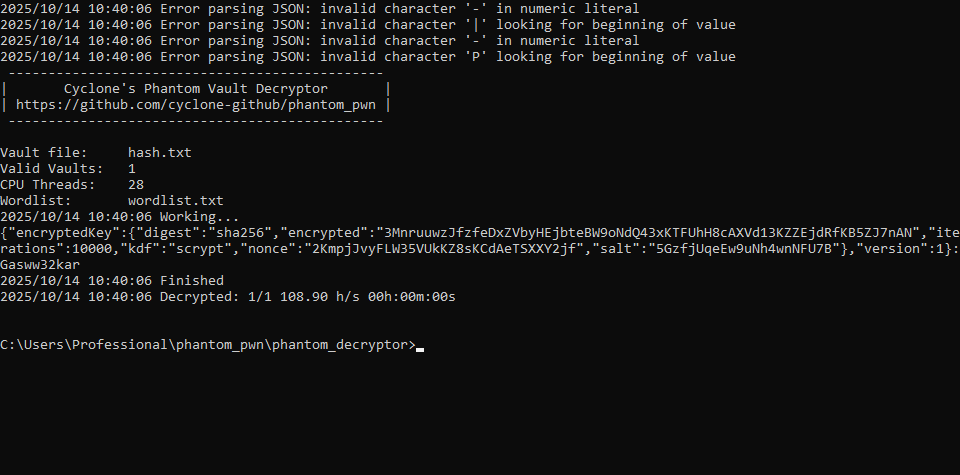
@cyclone Hello!, I'm trying to regain access to my Phantom wallet after reinstalling Windows and forgetting to save my seed phrase. Using the Windows.old files and your guide, I’ve walked through the process up to the decryption step. What should I do next to recover the seed phrase? Thank you.
-
@cyclone Hello!, I'm trying to regain access to my Phantom wallet after reinstalling Windows and forgetting to save my seed phrase. Using the Windows.old files and your guide, I’ve walked through the process up to the decryption step. What should I do next to recover the seed phrase? Thank you.
@immolatje Make sure to read through these posts as I've posted a complete walk-through on github. On Phantom wallets, recovering the wallet password is the 1st step of a multi-step process.
https://forum.hashpwn.net/post/601Phantom crypto wallet passwords recoverable with my
phantom_pwntoolset. The seed phrase is also recoverable once the password has been recovered, but is a multi-step process as described on my GitHub writeup.Read through this GitHub issue (walkthrough) and DM me if you run into any snags.
https://github.com/cyclone-github/phantom_pwn/issues/14#issuecomment-2613081472 -
@cyclone Hello!, I'm trying to regain access to my Phantom wallet after reinstalling Windows and forgetting to save my seed phrase. Using the Windows.old files and your guide, I’ve walked through the process up to the decryption step. What should I do next to recover the seed phrase? Thank you.
@immolatje To extract the mnemonic from the hash, you also need a hash to decrypt the second level of encryption. In your screenshot, only level 1 has been completed. You can simply import the Phantom files into your browser and log in with a password to access the seed phrase in your wallet.
-
New release:
phantom_pwn v1.0.0
https://github.com/cyclone-github/phantom_pwn/releasesSysadmin by day | Ethical hacker by night | Go Dev | hashpwn
3x RTX 4090 3x RTX 2080ti
Forum Rules -
Hi. I have a question, is it possible to automatically export the private key of the wallet we unlocked using your tool? Or the mnemonic by any chance.
I cannot send @cyclone a DM because my reputation is too low.
-
What should be the format of teh password as i can see my password is helloWorld but when i decrypt same in python all same metho itt doesn't decrypt that for phantom
@blacktest
This toolkit is written in Go, so I'm not sure what Python you're referring to.
The info you're requesting is in the GitHub README and first post of this topic. Upon successful decryption, the tool will print out a string with"{json}:{password}".----------------------------------------------- | Cyclone's Phantom Vault Decryptor | | https://github.com/cyclone-github/phantom_pwn | ----------------------------------------------- ... 2025/10/22 14:11:35 Working... {"encryptedKey":{"digest":"sha256","encrypted":"5pLvA3bCjNGYBbSjjFY3mdPknwFfp3cz9dCBv6izyyrqEhYCBkKwo3zZUzBP44KtY3","iterations":10000,"kdf":"pbkdf2","nonce":"NZT6kw5Cd5VeZu5yJGJcFcP24tnmg4xsR","salt":"A43vTZnm9c5CiQ6FLTdV9v"},"version":1}:password 2025/10/22 14:11:39 Decrypted: 1/1 6181.36 h/s 00h:00m:03s ... -
Hi cylone your tool was absolutely helpful the issue im having though is my phantom had other passwords and the password i have only lets me into 1 of the many wallets i have. is there a way for me to find the passwords for the other vaults as ive tried all variations and nothing cracks?
-
Hi cylone your tool was absolutely helpful the issue im having though is my phantom had other passwords and the password i have only lets me into 1 of the many wallets i have. is there a way for me to find the passwords for the other vaults as ive tried all variations and nothing cracks?
@kayso
Phantom only hasone password per wallet vault(similar to MetaMask), so if some wallets aren’t unlocking with your password, they’re likely from a different vault / browser profile, etc, and the password is not the issue.Also answered on Github:
https://github.com/cyclone-github/phantom_pwn/issues/24 -
yes i know its multiple vaults. I have 6 vaults in total and only 1 vault will unlock with wordlist. is there perhaps something wrong with the vault itself ect and is there any way to resolve this issue (the wordlist contains all possible passwords so password is not the issue)
-
Title: phantom_pwn
Author:cyclone
URL:https://github.com/cyclone-github/phantom_pwn
Description:Toolset to recover, extract and decrypt Phantom crypto vaults/wallets.


Phantom Vault Extractor & Decryptor
POC tools to recover, extract and decrypt Phantom vaults
This toolset is proudly the first publicly released Phantom Vault Extractor and Decryptor
- Contact me at https://forum.hashpwn.net/user/cyclone if you need help recovering your Phantom wallet password or seed phrase
- Note:
phantom_extractorsupports hashcat modes 30010, 26650, and 26651 for convenience, but these are third-party modules that are not affiliated with or included in the official hashcat beta or release builds at https://github.com/hashcat/hashcat
Writeup of my process of decrypting Phantom Wallets and recovering the seed phrase
Phantom vault location for Chrome extensions:
- Linux:
/home/$USER/.config/google-chrome/Default/Local\ Extension\ Settings/bfnaelmomeimhlpmgjnjophhpkkoljpa/ - Mac:
Library>Application Support>Google>Chrome>Default>Local Extension Settings>bfnaelmomeimhlpmgjnjophhpkkoljpa - Windows:
C:\Users\$USER\AppData\Local\Google\Chrome\User Data\Default\Local Extension Settings\bfnaelmomeimhlpmgjnjophhpkkoljpa\
Extractor usage example on test vault: (plaintext is
password)- Old pbkdf2 KDF
./phantom_extractor.bin bfnaelmomeimhlpmgjnjophhpkkoljpa/ ----------------------------------------------------- | Cyclone's Phantom Vault Hash Extractor | | Use Phantom Vault Decryptor to decrypt | | https://github.com/cyclone-github/phantom_pwn | ----------------------------------------------------- {"encryptedKey":{"digest":"sha256","encrypted":"5pLvA3bCjNGYBbSjjFY3mdPknwFfp3cz9dCBv6izyyrqEhYCBkKwo3zZUzBP44KtY3","iterations":10000,"kdf":"pbkdf2","nonce":"NZT6kw5Cd5VeZu5yJGJcFcP24tnmg4xsR","salt":"A43vTZnm9c5CiQ6FLTdV9v"},"version":1} ----------------------------------------------------- | hashcat -m 30010 hash (pbkdf2 kdf) | ----------------------------------------------------- $phantom$SU9HoVMjb1ieOEv18nz3FQ==$7H29InVRWVbHS4WcBJdTay0ONb4mLX9Q$g0vJAbflhH4jJJDvuv7Ar5THgzBmJ8tt6oajsQZd/dSXNNjcY5/0eGeF5c1NW1WU ----------------------------------------------------- | hashcat -m 26651 hash (pbkdf2 kdf) | ----------------------------------------------------- PHANTOM:10000:SU9HoVMjb1ieOEv18nz3FQ==:7H29InVRWVbHS4WcBJdTay0ONb4mLX9Q:g0vJAbflhH4jJJDvuv7Ar5THgzBmJ8tt6oajsQZd/dSXNNjcY5/0eGeF5c1NW1WU- New scrypt KDF
./phantom_extractor.bin bfnaelmomeimhlpmgjnjophhpkkoljpa/
 -----------------------------------------------------
|        Cyclone's Phantom Vault Hash Extractor       |
|        Use Phantom Vault Decryptor to decrypt       |
|    https://github.com/cyclone-github/phantom_pwn    |
 -----------------------------------------------------
{"encryptedKey":{"digest":"sha256","encrypted":"37fJoKsB9vwnKEzPgc2AHtYVsPTTzrXdTGacbgWxLxbiS7Ri3P3iNnf8csaKwJ4wpk","iterations":10000,"kdf":"scrypt","nonce":"49aomus4HiKLyg7F66pSinR4tpuUuJDHX","salt":"M1PMFn4p4gdCxZDzf8qX71"},"version":1}
 -----------------------------------------------------
|          hashcat -m 26650 hash (scrypt kdf)         |
 -----------------------------------------------------
PHANTOM:4096:8:1:ogSL4J4xP/wNbAjiA8Q4hA==:Iofs3VYyyaYFzHVkcMsnpkrjGQ2+Kni2:OacHaTJAM8dD7XJIj5bGMU3cM8QW3u92n+ngYjXsgRSR20FDnkMLQHTgPxJDefOx
Decryptor usage example:
 -----------------------------------------------
|       Cyclone's Phantom Vault Decryptor       |
| https://github.com/cyclone-github/phantom_pwn |
 -----------------------------------------------

Vault file:     hash.txt
Valid Vaults:   1
CPU Threads:    16
Wordlist:       wordlist.txt
2025/10/22 14:11:35 Working...
{"encryptedKey":{"digest":"sha256","encrypted":"5pLvA3bCjNGYBbSjjFY3mdPknwFfp3cz9dCBv6izyyrqEhYCBkKwo3zZUzBP44KtY3","iterations":10000,"kdf":"pbkdf2","nonce":"NZT6kw5Cd5VeZu5yJGJcFcP24tnmg4xsR","salt":"A43vTZnm9c5CiQ6FLTdV9v"},"version":1}:password
2025/10/22 14:11:39 Decrypted: 1/1 6181.36 h/s 00h:00m:03s

2025/10/22 14:11:39 Finished
Decryptor supported options:
-w {wordlist} (omit -w to read from stdin)
-h {phantom_wallet_hash}
-o {output} (omit -o to write to stdout)
-t {cpu threads}
-s {print status every nth sec}

-version (version info)
-help (usage instructions)

./phantom_decryptor.bin -h {phantom_wallet_hash} -w {wordlist} -o {output} -t {cpu threads} -s {print status every nth sec}

./phantom_decryptor.bin -h phantom.txt -w wordlist.txt -o cracked.txt -t 16 -s 10

cat wordlist | ./phantom_decryptor.bin -h phantom.txt

./phantom_decryptor.bin -h phantom.txt -w wordlist.txt -o output.txt
Decryptor credits:
- Shoutout to blandyuk for his help with research - https://github.com/blandyuk
- https://github.com/renfeee/spl-token-wallet/blob/master/src/utils/wallet-seed.js
Compile from source:
- This assumes you have Go and Git installed
git clone https://github.com/cyclone-github/phantom_pwn.git# clone repo- phantom_extractor
cd phantom_pwn/phantom_extractor# enter project directorygo mod init phantom_extractor# initialize Go module (skips if go.mod exists)go mod tidy# download dependenciesgo build -ldflags="-s -w" .# compile binary in current directorygo install -ldflags="-s -w" .# compile binary and install to $GOPATH- phantom_decryptor
cd phantom_pwn/phantom_decryptor# enter project directorygo mod init phantom_decryptor# initialize Go module (skips if go.mod exists)go mod tidy# download dependenciesgo build -ldflags="-s -w" .# compile binary in current directorygo install -ldflags="-s -w" .# compile binary and install to $GOPATH
- Compile from source code how-to:
@cyclone H Hi. I'm sorry if I'm asking for obvious things but...I installed the extractor and decryptor on linux and it seems i'm not able to run it . Running "phantom_extractor bfnaelmomeimhlpmgjnjophhpkkoljpa/" it says "phantom_extractor bfnaelmomeimhlpmgjnjophhpkkoljpa/" thought there is an executable file called "phantom_extractor" which has no extension but is an executable. If this is too obvious please send me private message. Appreciate your help very much.
-
@cyclone H Hi. I'm sorry if I'm asking for obvious things but...I installed the extractor and decryptor on linux and it seems i'm not able to run it . Running "phantom_extractor bfnaelmomeimhlpmgjnjophhpkkoljpa/" it says "phantom_extractor bfnaelmomeimhlpmgjnjophhpkkoljpa/" thought there is an executable file called "phantom_extractor" which has no extension but is an executable. If this is too obvious please send me private message. Appreciate your help very much.
-
Hi @cyclone bro. how are you doing? Thanks for sharing too. Btw how can I get 26650 kernel?
Could you help me? -
Hi, @cyclone , can u please give me you DM?



Hello! It looks like you're interested in this conversation, but you don't have an account yet.
Getting fed up of having to scroll through the same posts each visit? When you register for an account, you'll always come back to exactly where you were before, and choose to be notified of new replies (either via email, or push notification). You'll also be able to save bookmarks and upvote posts to show your appreciation to other community members.
With your input, this post could be even better 💗
Register Login