
JtR for Win11
-
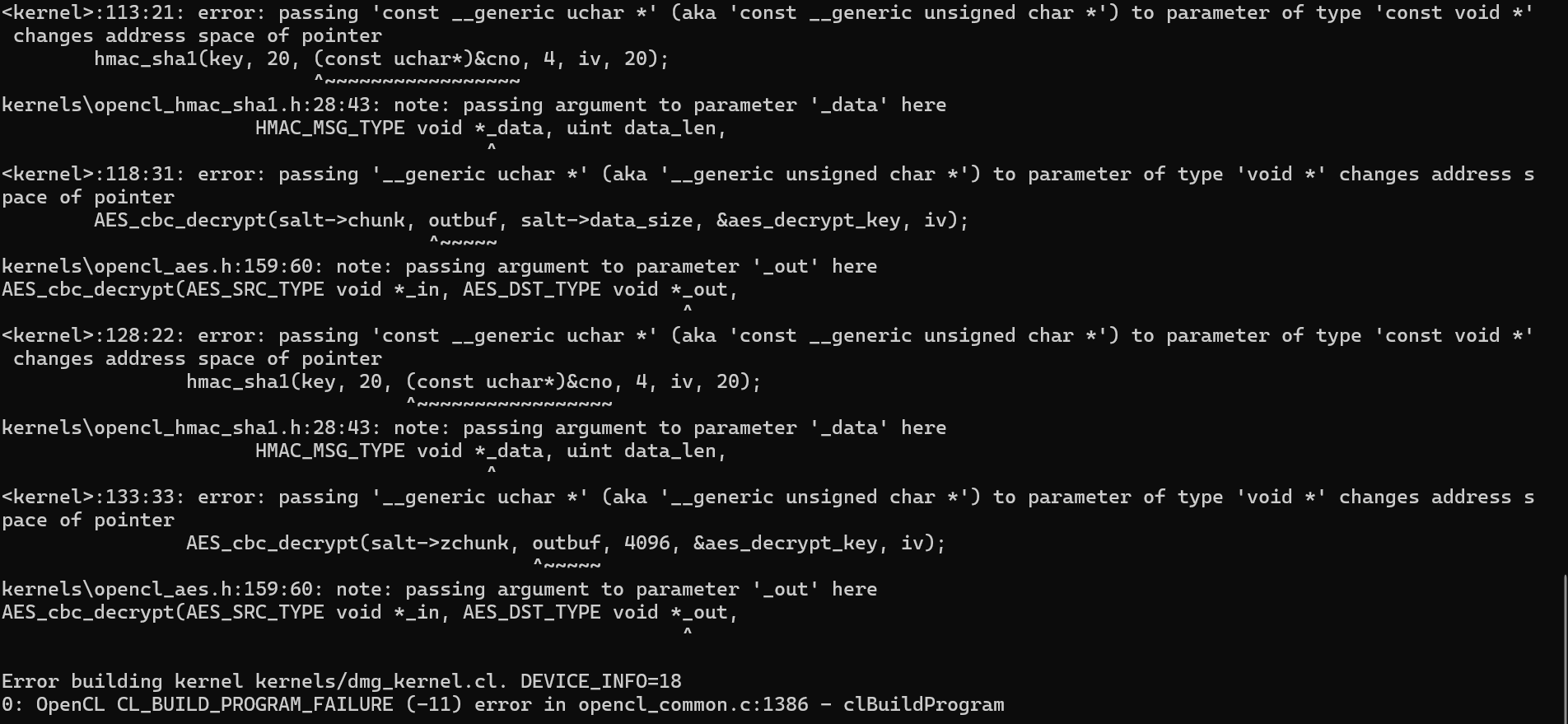
Help me run john the ripper with a GPU on win11. When I start, I get this error. She's famous. But I have difficulties with translation. And maybe I need to do something?
-
kernels\opencl_aes.h:159:60: note: passing argument to parameter '_out' here
AES_cbc_decrypt(AES_SRC_TYPE void *_in, AES_DST_TYPE void *_out,
^Error building kernel kernels/dmg_kernel.cl. DEVICE_INFO=18
0: OpenCL CL_BUILD_PROGRAM_FAILURE (-11) error in opencl_common.c:1386 - clBuildProgram -
-
OpenCL build error with recent NVIDIA driver and older JtR
I haven't encountered this error message before. Maybe the others can help. If not, I suggest trying the "john-users mailing list." If they can't help, no one can.
-
 C cyclone moved this topic from Hash Cracking on
-
C cyclone marked this topic as a question on
-
What version of jtr are you trying to run on Windows 11? TBH, hash cracking is better done from a linux distro (just my 2 cents).
You can download the latest official
jtr-jumbopre-combined windows binaries from their site:
https://www.openwall.com/john/Look for the download link below the following text:
Download the latest John the Ripper jumbo release (release notes) or development snapshot:
1.9.0-jumbo-1 64-bit Windows binaries in 7z, 22 MB <-- download link
If you want the latest version from GitHub, you'll have to download the source and compile yourself.
- Source code:
- Compile instructions for Windows:
Sysadmin by day | Ethical hacker by night | Go Dev | hashpwn
3x RTX 4090 3x RTX 2080ti
Forum Rules -
What version of jtr are you trying to run on Windows 11? TBH, hash cracking is better done from a linux distro (just my 2 cents).
You can download the latest official
jtr-jumbopre-combined windows binaries from their site:
https://www.openwall.com/john/Look for the download link below the following text:
Download the latest John the Ripper jumbo release (release notes) or development snapshot:
1.9.0-jumbo-1 64-bit Windows binaries in 7z, 22 MB <-- download link
If you want the latest version from GitHub, you'll have to download the source and compile yourself.
- Source code:
- Compile instructions for Windows:
john
John the Ripper 1.9.0-jumbo-1 OMP [cygwin 64-bit x86_64 AVX2 AC]
Copyright (c) 1996-2019 by Solar Designer and others
Homepage: http://www.openwall.com/john/john --list=opencl-devices
Platform #0 name: NVIDIA CUDA, version: OpenCL 3.0 CUDA 12.6.65
Device #0 (1) name: NVIDIA GeForce RTX 3080 Ti
Device vendor: NVIDIA Corporation
Device type: GPU (LE)
Device version: OpenCL 3.0 CUDA
Driver version: 560.94 [recommended]
Native vector widths: char 1, short 1, int 1, long 1
Preferred vector width: char 1, short 1, int 1, long 1
Global Memory: 12287 MB
Global Memory Cache: 2240 KB
Local Memory: 48 KB (Local)
Constant Buffer size: 64 KB
Max memory alloc. size: 3071 MB
Max clock (MHz): 1770
Profiling timer res.: 1000 ns
Max Work Group Size: 1024
Parallel compute cores: 80
CUDA cores: 5120 (80 x 64)
Speed index: 9062400
Warp size: 32
Max. GPRs/work-group: 65536
Compute capability: 8.6 (sm_86)
Kernel exec. timeout: no
PCI device topology: 01:00.0Device #1 (2) name: NVIDIA GeForce RTX 3080 Ti Device vendor: NVIDIA Corporation Device type: GPU (LE) Device version: OpenCL 3.0 CUDA Driver version: 560.94 [recommended] Native vector widths: char 1, short 1, int 1, long 1 Preferred vector width: char 1, short 1, int 1, long 1 Global Memory: 12287 MB Global Memory Cache: 2240 KB Local Memory: 48 KB (Local) Constant Buffer size: 64 KB Max memory alloc. size: 3071 MB Max clock (MHz): 1710 Profiling timer res.: 1000 ns Max Work Group Size: 1024 Parallel compute cores: 80 CUDA cores: 5120 (80 x 64) Speed index: 8755200 Warp size: 32 Max. GPRs/work-group: 65536 Compute capability: 8.6 (sm_86) Kernel exec. timeout: no PCI device topology: 0a:00.0 Device #2 (3) name: NVIDIA GeForce RTX 3080 Ti Device vendor: NVIDIA Corporation Device type: GPU (LE) Device version: OpenCL 3.0 CUDA Driver version: 560.94 [recommended] Native vector widths: char 1, short 1, int 1, long 1 Preferred vector width: char 1, short 1, int 1, long 1 Global Memory: 12287 MB Global Memory Cache: 2240 KB Local Memory: 48 KB (Local) Constant Buffer size: 64 KB Max memory alloc. size: 3071 MB Max clock (MHz): 1710 Profiling timer res.: 1000 ns Max Work Group Size: 1024 Parallel compute cores: 80 CUDA cores: 5120 (80 x 64) Speed index: 8755200 Warp size: 32 Max. GPRs/work-group: 65536 Compute capability: 8.6 (sm_86) Kernel exec. timeout: no PCI device topology: 0b:00.0Platform #1 name: Intel(R) OpenCL, version: OpenCL 3.0 WINDOWS
Device #0 (4) name: 11th Gen Intel(R) Core(TM) i9-11900KF @ 3.50GHz
Device vendor: Intel(R) Corporation
Device type: CPU (LE)
Device version: OpenCL 3.0 (Build 0)
Driver version: 2024.18.6.0.02_160000
Native vector widths: char 64, short 32, int 16, long 8
Preferred vector width: char 1, short 1, int 1, long 1
Global Memory: 65416 MB
Global Memory Cache: 256 KB
Local Memory: 32 KB (Global)
Constant Buffer size: 128 KB
Max memory alloc. size: 32708 MB
Max clock (MHz): 3500
Profiling timer res.: 100 ns
Max Work Group Size: 8192
Parallel compute cores: 16
Speed index: 448000 -
I executed the command in the terminal
./configure && make -s clean && make -sj4
make windows-package
When finished in the folder JtR\run
the file is not being created cygOpenCL-1.dll which is needed to run GPU
I can record a video so that they can see what's going on with me. -


Hello! It looks like you're interested in this conversation, but you don't have an account yet.
Getting fed up of having to scroll through the same posts each visit? When you register for an account, you'll always come back to exactly where you were before, and choose to be notified of new replies (either via email, or push notification). You'll also be able to save bookmarks and upvote posts to show your appreciation to other community members.
With your input, this post could be even better 💗
Register Login