Skip to content
  • Categories
  • Recent
Skins
  • Light
  • Brite
  • Cerulean
  • Cosmo
  • Flatly
  • Journal
  • Litera
  • Lumen
  • Lux
  • Materia
  • Minty
  • Morph
  • Pulse
  • Sandstone
  • Simplex
  • Sketchy
  • Spacelab
  • United
  • Yeti
  • Zephyr
  • Dark
  • Cyborg
  • Darkly
  • Quartz
  • Slate
  • Solar
  • Superhero
  • Vapor

  • Default (Slate)
  • No Skin
Collapse
Brand Logo

hashpwn

Home | Donate | GitHub | Matrix Chat | PrivateBin | Rules

  1. Home
  2. Hash Cracking / Recovery
  3. Crypto Currency: $bitcoin$ $metamask$ $electrum$ $ethereum$ $blockchain$, etc.
  4. metamask vault data with pass recovery srp

metamask vault data with pass recovery srp

Scheduled Pinned Locked Moved Crypto Currency: $bitcoin$ $metamask$ $electrum$ $ethereum$ $blockchain$, etc.
7 Posts 2 Posters 120 Views 2 Watching
  • Oldest to Newest
  • Newest to Oldest
  • Most Votes
Reply
  • Reply as topic
Log in to reply
This topic has been deleted. Only users with topic management privileges can see it.
  • N Online
    N Online
    Nunf
    wrote last edited by
    #1

    Hello, can i somehow recover my metamask Secret Recovery Phrase from my vault data like:
    "{"data": "","iv": "","keyMetadata": {"algorithm": "PBKDF2","params": {"iterations": }},"salt": ""}"
    and i also know my local metamask password for metamask

    1 Reply Last reply
    0
    • cycloneC Online
      cycloneC Online
      cyclone
      Admin Trusted
      wrote last edited by
      #2

      Have you given metamask_pwn a try?
      https://forum.hashpwn.net/post/74

      Sysadmin by day | Hacker by night | Go Developer | hashpwn site owner
      3x RTX 4090

      1 Reply Last reply
      1
      • N Online
        N Online
        Nunf
        wrote last edited by
        #3

        Yesterday I just logged into my MetaMask as usual, but I ran into a problem that prevented me from seeing the authorization window.
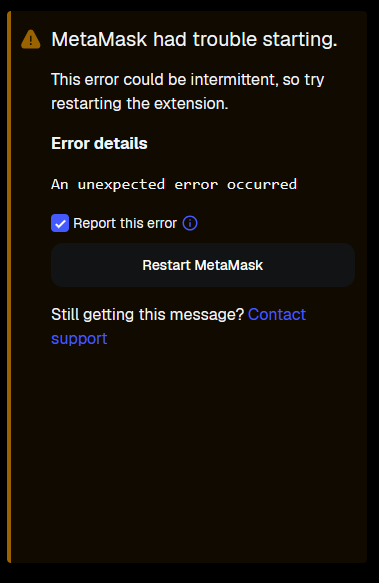
        {3F1AC935-9F44-4002-874C-E21D97C1ED7E}.png

        So, I have MetaMask database files on my computer and I know a password that's 1000% guaranteed to work for this encrypted database. But I need to somehow decrypt the database using something, which I'm not very good at. Yesterday, using various guides, I managed to find a line in the file that looked like this: "{"data": "","iv": "","keyMetadata": {"algorithm": "PBKDF2","params": {"iterations": }},"salt": ""}"

        Am I correct in understanding that this data and password are sufficient to obtain SRP?
        but I don't really understand which specific application and what data, in what form, I should transfer there

        Yesterday I tried(https://github.com/cyclone-github/metamask_pwn/releases) to use the program. I extracted data of the type I described above from a file named number and simply placed json object(data, salt...) in a text file. I also created another file and wrote the password there. I ran the command "metamask_decryptor_amd64.exe -h wallet.txt -w pass.txt" and received the error "Error reading vault file: bufio.Scanner: token too long"

        {D66AD639-BB8E-4429-AE0C-8C5EE77CD23B}.png

        1 Reply Last reply
        0
        • N Online
          N Online
          Nunf
          wrote last edited by
          #4

          i using zen browser(based on firefox)

          1 Reply Last reply
          0
          • cycloneC Online
            cycloneC Online
            cyclone
            Admin Trusted
            wrote last edited by cyclone
            #5

            Manually copy / pasting the Metamask json vault is likely to cause typos or other parsing errors, so using the metamask_extractor is recommend. However, the metamask_pwn toolkit only supports Chrome based browser extensions, so may not work with your Zen browser extension as this is untested.
            Feel free to DM me and we can see if the extractor and decryptor can be modified to work.

            In the mean time, make sure you do not uninstall the Metamask extension from your browser since doing so would irrecoverably delete your Metamask wallet causing you to lose access to any crypto it contained.

            Sysadmin by day | Hacker by night | Go Developer | hashpwn site owner
            3x RTX 4090

            1 Reply Last reply
            0
            • cycloneC Online
              cycloneC Online
              cyclone
              Admin Trusted
              wrote last edited by
              #6

              Update: Wallet Recovered

              For those following along, the Zen browser is based on FireFox, and its Metamask wallet extension is not supported by any known wallet recovery tool, so a custom tool was written to recover the Zen Metamask wallet.

               ---------------------------------------- 
              | Cyclone's Zen Metamask Vault Decryptor |
               ---------------------------------------- 
              
              Vault file:     zen_metamask.txt
              Valid Vaults:   1
              CPU Threads:    16
              Wordlist:       tmp_wordlist.txt
              Working...
              
              Decrypted Vault: '{redacted}'
              Seed Phrase:    '{redacted}'
              Vault Password: '{redacted}'
              
              Decrypted: 1/1  11.01 h/s        00h:00m:00s

              

              Sysadmin by day | Hacker by night | Go Developer | hashpwn site owner
              3x RTX 4090

              N 1 Reply Last reply
              0
              • cycloneC cyclone

                Update: Wallet Recovered

                For those following along, the Zen browser is based on FireFox, and its Metamask wallet extension is not supported by any known wallet recovery tool, so a custom tool was written to recover the Zen Metamask wallet.

                 ---------------------------------------- 
                | Cyclone's Zen Metamask Vault Decryptor |
                 ---------------------------------------- 
                
                Vault file:     zen_metamask.txt
                Valid Vaults:   1
                CPU Threads:    16
                Wordlist:       tmp_wordlist.txt
                Working...
                
                Decrypted Vault: '{redacted}'
                Seed Phrase:    '{redacted}'
                Vault Password: '{redacted}'
                
                Decrypted: 1/1  11.01 h/s        00h:00m:00s
                
                N Online
                N Online
                Nunf
                wrote last edited by
                #7

                I confirm. None of the ready-made extractor or decryptor programs worked with the Zen browser. This person sorted out the situation for free, adapted the programs for my browser, and restored my SRP. For that, I'm incredibly grateful.

                1 Reply Last reply
                🍻
                0
                Reply
                • Reply as topic
                Log in to reply
                • Oldest to Newest
                • Newest to Oldest
                • Most Votes


                Who's Online [Full List]

                13 users active right now (4 members and 9 guests).
                hashpwn-bot, Nunf, Jarumisi1, cyclone

                Board Statistics

                Our members have made a total of 10.1k posts in 174 topics.
                We currently have 366 members registered.
                Please welcome our newest member, genabnb.
                The most users online at one time was 49 on Thursday, December 26, 2024.

                • Login

                • Don't have an account? Register

                • Login or register to search.
                • First post
                  Last post
                0
                • Categories
                • Recent